Azure Bastion Capabilities
This project explores some of the Azure Bastion.
Check out the project code on this GitHub Repository and follow the README on deploying Azure Bastion in your cloud environment.
Project Overview
The project code explores both capabilities of Azure Bastion.
- Access via the public endpoint
- Access via a private endpoint (Premium SKU only)
In both situations connection is still over a TLS connection. Organisation needs or governance requirements may prompt the need for one option over another. We explore both, and you would be able to deploy one or the other by configuration variables set in the available tfvars file in the repo.
Over Public Connection
Public endpoint architecture diagram
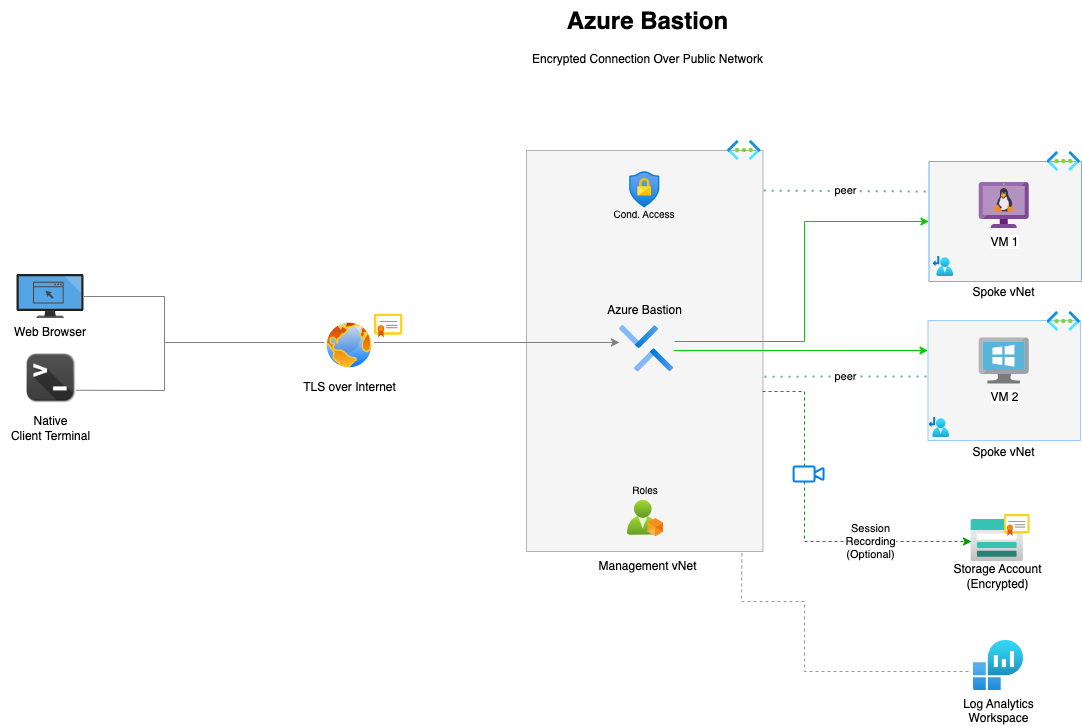
In this architecture, users connect to Azure Bastion through its public IP endpoint, where all required authentication and authorization controls—such as Azure AD, MFA, and RBAC—can be applied before access is granted. This secure, identity-driven approach eliminates the need for a VPN, removing the overhead of provisioning and managing additional infrastructure to reach resources within the virtual network.
Over Private Connection
Private endpoint architecture diagram
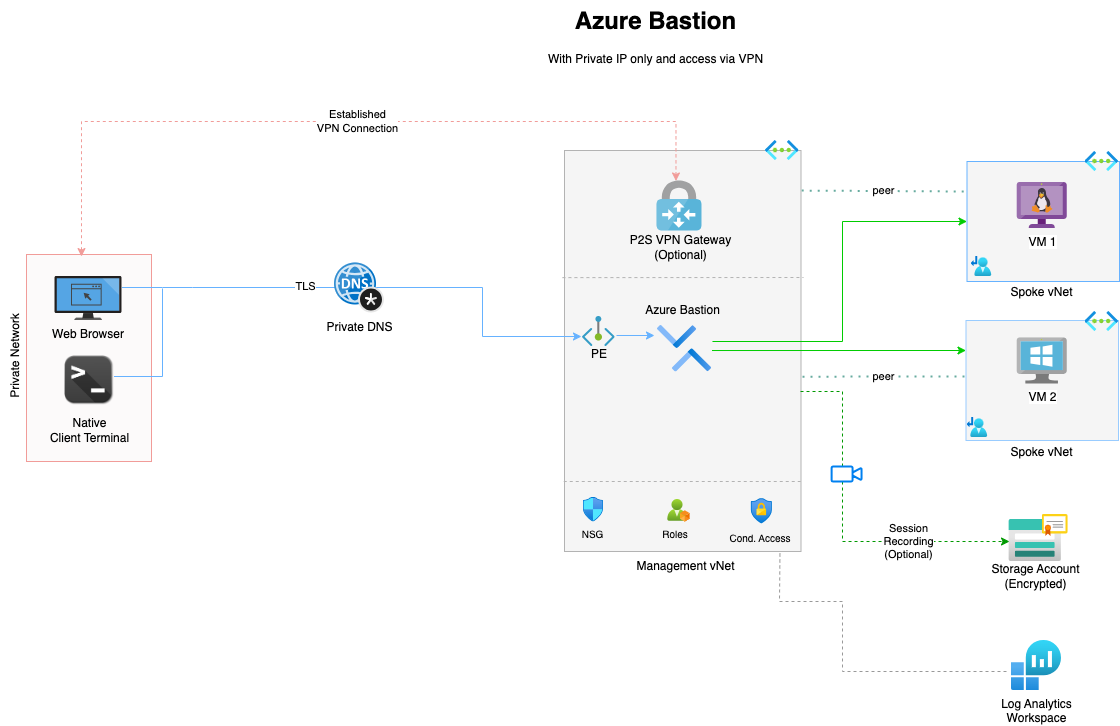
In this architecture, users connect to Azure Bastion through a private endpoint, accessed via an existing VPN connection into the environment. This ensures all administrative traffic remains on the internal network and never touches the public internet. Azure AD, MFA, and RBAC can be enforced at the control plane, providing strong identity-based authentication before access is granted. Although a VPN, or some means unto the private network is required for private access, this model significantly enhances security by eliminating public exposure while maintaining seamless access to resources within the virtual network.
Considerations
The architecture deployed is usually driven by an organisation governance policies or security requirement. If your organisation policies does not explicitly states this then my recommendation would be to deploy the first architecture and connect over the public endpoint ensuring all the necessary Authentication and RBAC controls are in place.
Cost
Azure Bastions comes in 3 SKUs so do your estimations. It comes at fixed prices so fairly easy to make estimations. See and example below but do have look at the Azure pricing calculator.
Cost Estimation Example (Monthly)
- Azure Bastion Premium SKU: ~$0.45/hour → ~$324/month
- Storage Account (100 GB): ~$1.80/month
- Log Analytics (1 GB/day): ~$69/month
Total: ~$394.80/month
Note: Actual costs may vary based on usage and region.
Refer to Azure Pricing Calculator for detailed estimates.
Security Policies
As mentioned previously this may influence the pattern your organisation adopts so do have a chat with the security folks or the Architects on the project.
What Next?
As always, further learning and research. I have a blog post you may want to read up on if interested in Azure Bastion for your organisation. There are great resources out there as well, a quick google search should point some out but always starts with the Microsoft official documentation.
